Scoring #
Scoring uses your defined scorecards to automatically evaluate every call against your quality standards. Rather than relying on spot-check audits of a small sample of calls, scoring gives you an objective, consistent measure of call quality across 100% of your interactions — providing a complete picture of performance, coaching needs, and trends.
Benefits of Scoring #
Objective quality measurement — scorecards move quality assessment from subjective impression to measurable criteria, ensuring consistency and fairness across your team. Every call is evaluated using the same rules.
Identifying coaching opportunities — by reviewing which calls score lower and which criteria drive those scores, you can target coaching and feedback to the specific areas where individuals need support.
Tracking improvement — scoring over time shows whether training interventions, process changes, or individual coaching are having a measurable impact on call quality.
Accountability and recognition — transparent scoring gives users clear visibility into what is expected and how they are performing, and allows you to recognize high performers objectively.
Data-driven insights — aggregate scoring data reveals patterns — which teams, users, or call types have higher or lower scores — helping you prioritize where to focus improvement efforts.
Setting Up Scorecards #
Before you can view scoring data, scorecards must be configured by an administrator. Scorecards define the criteria against which calls are evaluated — such as greeting quality, compliance with scripts, handling of specific scenarios, or sentiment management.
tip
Only users with the Quality Assurance license are able to have their calls scored. Ensure users who need scoring configured have this license assigned.
For details on creating and configuring scorecards, refer to the Scoring configuration section.
Understanding the Score Report #
The Scoring view displays aggregate results across all your calls, showing how your team performed against each of your configured scorecards.
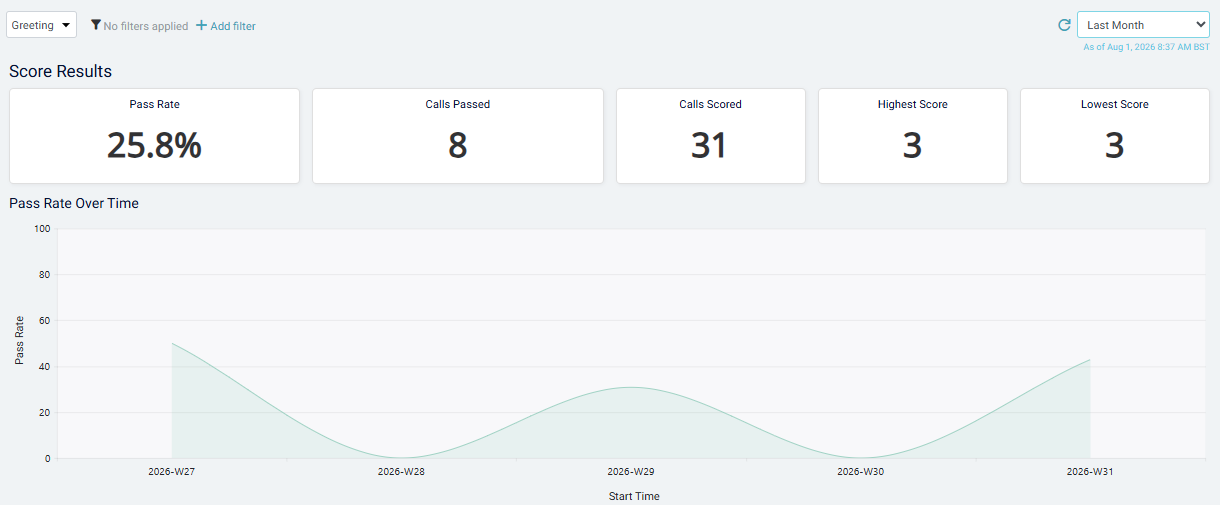
Use the dropdown menu in the top left to select which scorecard you want to view results for. The view will refresh to show:
- Overall score — the average score across all calls evaluated with this scorecard
- Score distribution — how many calls fall into each performance band
- Performance by user or team — depending on your view settings, you can see which individuals or groups scored highest and lowest
- Trends over time — how average scores have moved week-to-week or month-to-month, helping you track whether performance is improving or declining
Clicking on individual users, time periods, or score bands drills down to show the specific calls that make up those results, allowing you to review examples and understand what drove the scores.